Palette relationships and color-area suggestions are original styling advice. They are not official presets, skin-tone requirements, or verified scoring strategies.
Give each color a different job
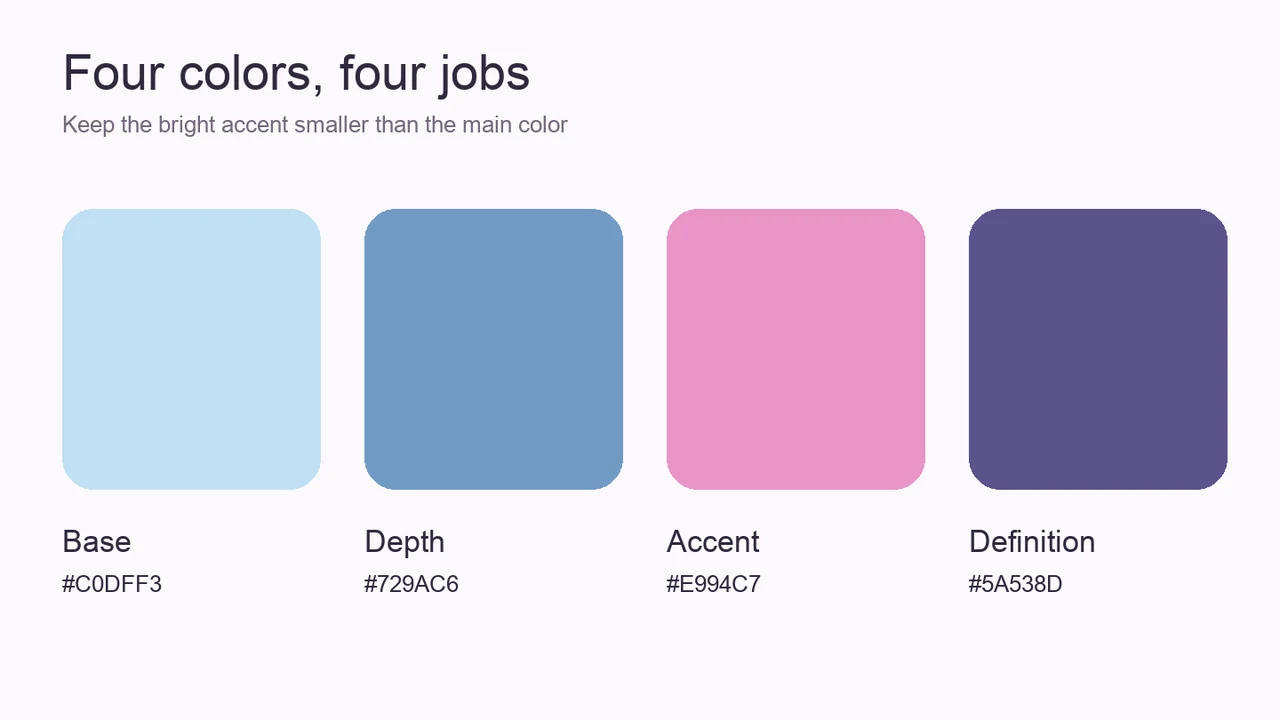
A main shade establishes the look’s direction; a depth shade separates its outer region; an accent gives one smaller area interest. The final reference can define an edge or provide a highlight, depending on how dark the first colors are.
You do not have to use four colors in every look. The diagram is an example of planning four roles, not a claim that the game has four fixed palette slots.
Pick the relationship before the exact shade
For cool blue and warm pink, make blue the larger area and use pink as a smaller interruption. For a green-and-pink direction, let green lead, then add a restrained darker edge so the pale main area remains visible.
For warm neutrals, compare the lightest reference against your character before committing to it. A palette base is not a required skin tone. Adjust the reference if the contrast is stronger or weaker than you intended.
What should you change when colors clash?
Start with area rather than hue. Two bright regions of equal size compete for attention; reducing one can make the other read as the main choice. Keep that accent in a distinct smaller area instead of repeating it across every feature.
If the entire look is muddy, check whether the depth and outline are too close in darkness. Restore a lighter gap or move the definition into a smaller region. More colors do not automatically fix weak separation.
- Name the color that should be noticed first.
- Reduce the brightest competing region.
- Check the separation between main color and depth.
- Compare the hair and face together before selecting another shade.
Compare hair color after the eye plan
Hair can frame the eye or conceal it. Check its outline first, then its color relationship with the makeup. A dark hairstyle next to dark eye shadow may need a lighter gap; a bright hairstyle may already supply enough accent.
Change one part at a time so you can see what improves the composition. This is a self-review method, not a statement that any hair color earns more votes.
Use the palette helper without depending on HEX entry
The helper offers four original reference sets and shows their HEX values. Save those values outside the game if you want to compare the same colors later. The helper does not change your Roblox character or unlock a finish.
Direct text entry, exact color precision, gloss, and glitter controls have not been verified. If the game offers a different picker, approximate the color relationship rather than treating a missing HEX box as a failed feature.