Brush Size, Strength, and a color picker are visible in the reviewed creator recording. Exact numeric limits, current behavior, layer rules, and in-game HEX entry remain unverified. Drawing plans are our own.
What the real recorded brush interface shows
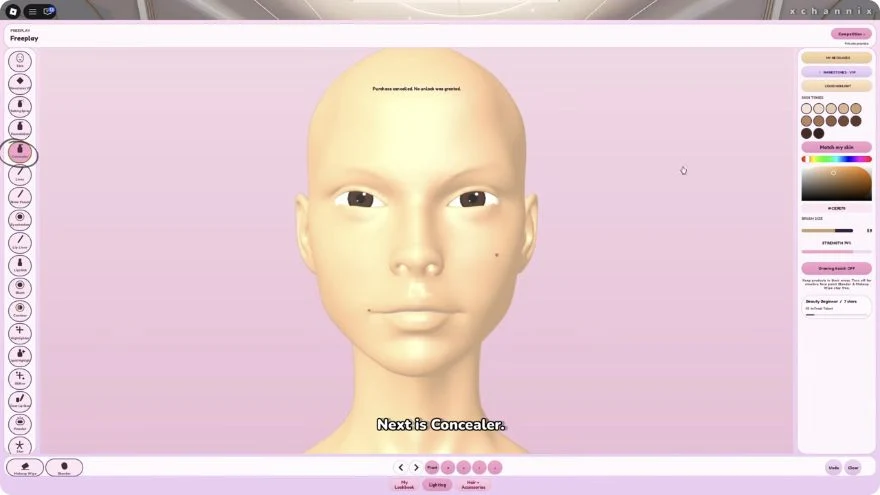
At 5:05 in chani’s Makeup Mania video published October 3, makeup categories are arranged on the left and a color picker, Brush Size, and Strength are visible on the right. This is a direct observation of the video frame reviewed on October 11, rather than a guess from the game title.
Use the screenshot to recognize the recorded controls, then compare your current interface before applying instructions. The frame does not establish the numeric range, what Strength mathematically changes, whether HEX text can be pasted, or whether the layout is unchanged today.
Four color roles for a Makeup Mania palette
A base is the main color people notice. A depth shade gives the outer area structure. An accent introduces a small contrast, and a defining shade keeps the border legible. Assign these roles before adding extra colors.
For example, the Y2K palette uses Ice #C0DFF3 as its base, Denim #729AC6 for depth, Candy #E994C7 as an accent, and Dusk #5A538D for definition. These are references rather than a tested import format.
Start with broad shapes, then narrow the detail
Use the controls available to establish the largest eye-color area first. Once the silhouette is clear, add the darker edge and smallest accent. A shape that reads at a distance provides a useful base even when fine details are hard to place.
If the interface offers different brush widths or opacity settings, test a small change before applying it across the whole look. Brush Size and Strength are visible in the dated recording above; their current behavior and exact ranges have not been tested here. Do not interpret the word LAYERS in the game title as documentation for a particular editing workflow.
What the Shape Stencils pass actually lists
The official catalog description names star, heart, diamond, circle, and eyebrow-shape stencils. Its October 6 snapshot price is 199 Robux. The VIP description also lists Shape Stencils as a benefit.
The catalog confirms those names, but it does not document the selection menu, resizing controls, or how shapes interact with layers. Check the current store and interface before planning a design that depends on a specific stencil behavior.
Check contrast before adding another color
Zooming or inspecting the whole character, where your interface allows it, can expose shapes that merge together. If the outer eye disappears against dark hair, restore a lighter gap or reduce the width of the darkest area.
The palette helper lets you compare 12 reference plans and edit all four colors. Use the colors to plan; you do not need to match every HEX code exactly for the relationships to make sense. No palette is a guaranteed match for a round prompt or a voting advantage.